
How to create a zone?
This articles contains the information about how you can create a zone in Openprovider.
Question :
How do I create a zone in Openprovider ?
Answer :
You can create a zone in two ways :
1. Via Reseller Control Panel (RCP);
2. Via API
Creating a zone via Reseller Control Panel (RCP)
There are 2 options how to create a zone via the Reseller Control panel
1. Via DNS management
2. Via Domain detail page
1. Via DNS management
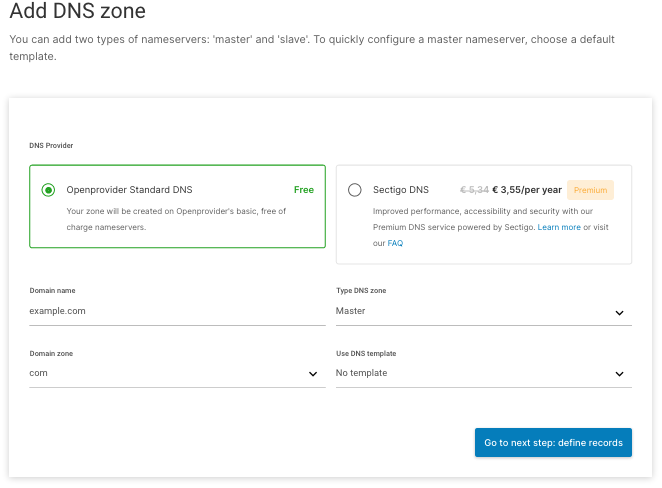
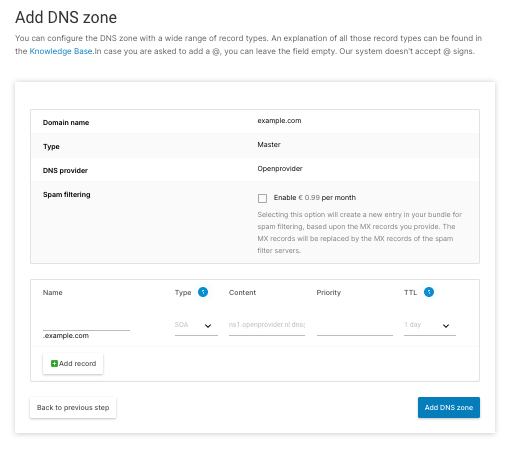
- Go to DNS Management > Zone Overview
- Select the nameserver which you want to use.
This can be the Openprovider nameserver of the Premium Sectigo DNS nameserver. Want to know more about Premium Sectigo DNS, click here!
- Fill in the domain and the extension.
2. Via Domain detail page
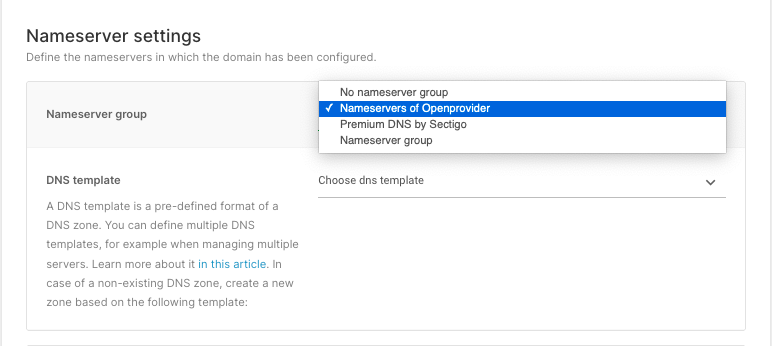
When you are registering or transferring a domain, you will be asked in the last step to define the nameserver you want to use. If you select the openprovider or Sectigo DNS nameservers, the system will automatically create a new zone, only containing the SOA and NS record.
You can also select a template here (optional), in order to create your zone in a pre-defined format. Be aware - this will not overwrite any zone and therefore will only work when there is no existing zone yet.
Creating a zone via API
DNS Zone can also be created via Openprovider API.
Checkout this link to know more!
NOTE: Please review the Terms and Conditions of Openprovider DNS service here before creating new zones for external domains.