
Webhook Notification System
The webhook system is built upon the existing email notification process and allows automatic delivery of domain mutation events to external systems.
1. Enabling or Disabling Webhooks
The IPs to whitelist are: 185.87.187.130 and 34.34.72.46.
Webhook notifications can be managed via the modifyResellerRequest API call. This API allows enabling/disabling webhook notifications and configuring webhook parameters.
✅ API Parameters
Parameter
Type
Description
notificationsSettings.isWebhookEnabled
bool
Enables/disables webhook notifications for domain events.
notificationsSettings.isEmailEnabled
bool
Reserved for future use (currently has no effect).
notificationsSettings.webhookSettings.host
string
HTTPS URL endpoint that receives webhook POST requests.
notificationsSettings.webhookSettings.apiKey
string
Token used for webhook authorization (sent in the Authorization header).
notificationsSettings.webhookSettings.signatureSecret
string
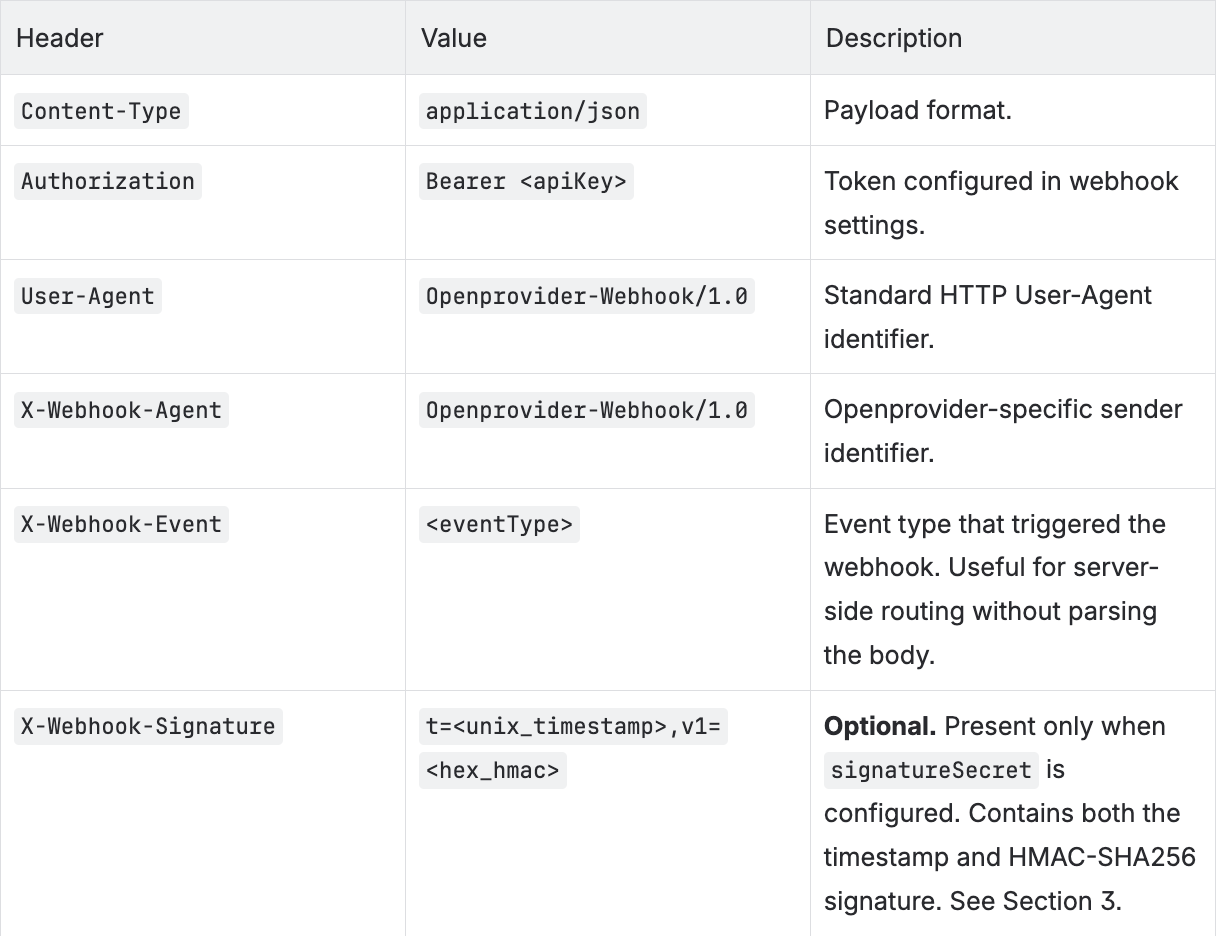
Optional. Shared secret used to generate HMAC-HMAC-SHA256 request signatures. When set, each request includes an X-Webhook-Signature header containing both the timestamp and signature. When not set, no signature header is sent. Secret rotation is fully controlled by the reseller. See Section 3.
🧾 XML API Example
<?xml version="1.0" encoding="UTF-8"?>
<openXML>
    <credentials>
        <username>username</username>
        <password>password</password>
        <hash></hash>
    </credentials>
    <modifyResellerRequest>
        <notificationsSettings>
            <isWebhookEnabled>1</isWebhookEnabled>    <!-- 0/1/true/false -->
            <webhookSettings>
                <host>https://webhook.example.com/endpoint</host>
                <apiKey>your_api_key_here</apiKey>
                <signatureSecret>your_signature_secret</signatureSecret>    <!-- optional -->
            </webhookSettings>
        </notificationsSettings>
    </modifyResellerRequest>
</openXML>
🧾 REST API Example
curl --location --request PUT '<op_api_host>/v1beta/resellers/<resellerId>' \
--header 'Content-Type: application/json' \
--header 'Authorization: Bearer <op_auth_token>' \
--data-raw '{
  "notifications_settings": {
    "is_webhook_enabled": true,
    "webhook_settings": {
      "host": "https://webhook.example.com/endpoint",
      "api_key": "your_api_key_here",
      "signature_secret": "your_signature_secret"
    }
  }
}'
🔍 Validation
When webhookSettings are saved, the system automatically validates the host URL by sending a test webhook. A successful webhook (HTTP 200 OK) confirms the configuration.
If signatureSecret is configured, the test webhook includes the same X-Webhook-Signature header as production webhooks, allowing you to validate your signature verification logic end-to-end during setup.
2. Webhook Processing
Payload Structure
The payload includes schemaVersion at the root level. domainId is located inside the data object.
{
  "id": 123,
  "schemaVersion": "1.0",
  "eventType": "outgoingTransferCompleted",
  "timeStamp": 1757662480,
  "data": {
    "domainId": 456,
    "domain": "example.net",
    "action": "outgoing transfer succeeded",
    "status": "DEL",
    "orderDate": "2023-08-08",
    "activationDate": null,
    "renewalDate": null,
    "expirationDate": null,
    "comments": "Message from registry: Message1",
    "registryMessage": null
  }
}
Request Headers
Each webhook request includes the following headers:
📬 Example Webhook Request
curl -v --location --request POST <webhook_host_url> \
--header 'Content-Type: application/json' \
--header 'Authorization: Bearer <webhook_apiKey>' \
--header 'User-Agent: Openprovider-Webhook/1.0' \
--header 'X-Webhook-Agent: Openprovider-Webhook/1.0' \
--header 'X-Webhook-Event: outgoingTransferCompleted' \
--header 'X-Webhook-Signature: t=1757662480,v1=<hex_hmac>' \
--data-raw '{
  "id": 1,
  "schemaVersion": "1.0",
  "eventType": "outgoingTransferCompleted",
  "timeStamp": 1757662480,
  "data": {
    "domainId": 1,
    "domain": "example.net",
    "action": "outgoing transfer succeeded",
    "status": "DEL",
    "orderDate": "2023-08-08",
    "activationDate": null,
    "renewalDate": null,
    "expirationDate": null,
    "comments": "Message from registry: Message1",
    "registryMessage": null
  }
}'
✅ Expected Response
-
HTTP 200 → Webhook considered successfully delivered.
-
Any other code → Delivery failed, and the retry mechanism is triggered.
🔁 Retry Policy
If a webhook fails (non-200 response or timeout), the system retries delivery up to 5 times using a progressive delay schedule:
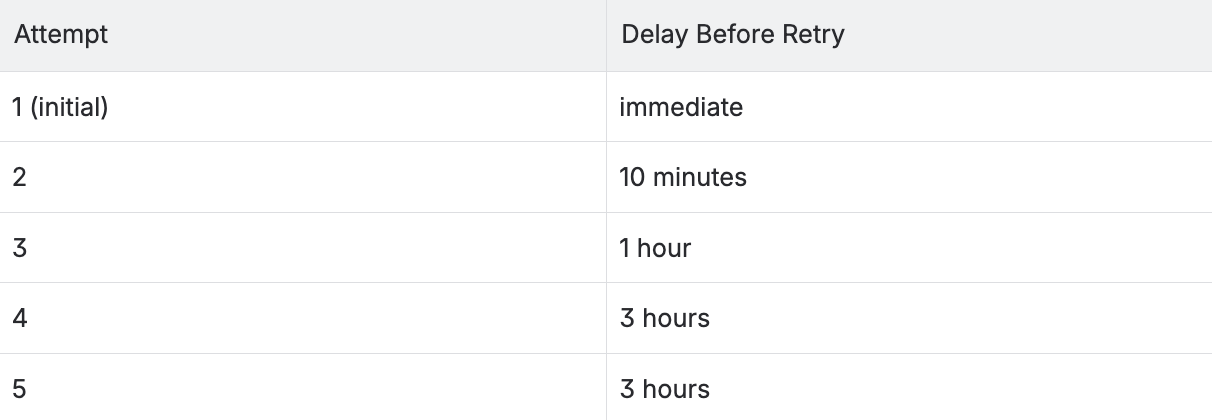
If all attempts fail, the system:
-
Logs the event as undelivered.
-
Sends an email notification to the reseller with subject:
[OPENPROVIDER] Failed webhooks
3. HMAC Signature Validation (Optional)
To enable signature validation, set signatureSecret in webhookSettings (see Section 1). When configured, each request is signed using HMAC-HMAC-SHA256, allowing your server to verify the request originated from Openprovider and that the payload was not modified in transit.
Signature Header
X-Webhook-Signature: t=<unix_timestamp>,v1=<hex_hmac>
The header contains two values:
-
t— Unix timestamp (seconds) at the time the webhook was sent. -
v1—HMAC-HMAC-SHA256 hex digest of the signed string.
Signature Formula
stringToSign = timestamp + "." + body signature = HMAC-SHA256(stringToSign, signatureSecret)
Where:
-
timestampis thet=value from theX-Webhook-Signatureheader. -
bodyis the raw JSON payload exactly as received. -
signatureSecretis the secret configured in your webhook settings.
Verifying on Your Server
-
Extract
tandv1from theX-Webhook-Signatureheader. -
Reconstruct:
stringToSign = t + "." + rawBody -
Compute:
HMAC-HMAC-SHA256(stringToSign, signatureSecret) -
Compare your result with the
v1value. If they match, the request is authentic.
Note: Use a constant-time comparison to prevent timing attacks.
Secret rotation is fully controlled by the reseller through webhook settings, with no downtime required.
4. Webhook Event Types
Event Type
Description
testEvent
Test event for validating webhook configuration.
outgoingTransferCompleted
Outgoing transfer successfully completed.
incomingTransferCompleted
Incoming transfer successfully completed.
incomingTransferFailed
Incoming transfer failed.
incomingTransferCanceled
Incoming transfer canceled.
outgoingTransferCanceled
Outgoing transfer canceled.
outgoingTransferPending
Outgoing transfer pending.
incomingTransferPending
Incoming transfer pending.
deletionCompleted
Domain deletion completed.
deletionFailed
Domain deletion failed.
registrationCompleted
Domain registration completed.
registrationPending
Domain registration pending.
registrationFailed
Domain registration failed.
tradeFailed
Trade operation failed.
tradePending
Trade operation pending.
updateFailed
Domain update failed.
updateCompleted
Domain update completed.
messageReceived
New message received from registry.
restoreFailed
Domain restore failed.
disputeReceived
Dispute opened for domain.
disputeClosed
Dispute closed.