# FAQ - General questions
# Deprecation of client authentication EKU from Sectigo SSL/TLS certificates
Sectigo recommends against using publicly trusted certificates for Client Authentication purposes.
Also, major browser and root program providers have introduced new security requirements that prohibit the inclusion of the Client Authentication EKU in publicly trusted SSL/TLS certificates.
Thus, since **October 7, 2025** SSL certificates no longer include the Client Authentication EKU by default.
Deadline is **May 15, 2026** when the Client Authentication EKU will be permanently removed from all newly issued SSL/TLS certificates.
---
#### This change applies to both new certificates and reissued or renewed certificates.
SSL/TLS certificates that were issued before the deprecation deadlines and include the Client Authentication EKU will continue to work as they were issued—until they expire or are revoked.
This change only applies to newly issued certificates
- starting April 07, 2025 for eIDAS QWAC
- starting October 14, 2025 for other SSL/TLS certificates.
All public SSL/TLS certificates issued before May 15, 2026 — including those containing the Client Authentication EKU — will remain valid until their expiration date, provided they are not revoked.
However, after May 15, 2026:
- No new or reissued certificates will include the Client Authentication EKU.
- Renewals after this date will automatically exclude Client Authentication.
---
This if only effecting organizations that use certificates for **mutual TLS (**mTLS), **server-to-server authentication**, or other **Client Authentication** purposes.
If your organization relies on SSL/TLS certificates for **Client Authentication**, you will need to transition to a **Private PKI (Private CA)** solution.
No changes are being made at this time to Sectigo’s S/MIME certificates.
- Multipurpose S/MIME certificates will continue to support the Client Authentication EKU.
- Strict profile S/MIME certificates do not support Client Authentication EKU and remain unchanged.
---
#### What to do:
- Assess whether you are using Sectigo SSL/TLS certificates for Client Authentication purposes, including mTLS or server-to-server authentication.
- If so, contact your sales manager to explore Private CA options.
- Plan your migration ahead of the May 15, 2026 soft deadline to avoid disruption.
# My SSL suddenly become revoked
## Question
My SSL certificate was revoked unexpectedly. Why did this happen?
## Answer
The private key of an SSL certificate is highly sensitive data and must be securely stored by the customer. Any leak of the private key can lead to traffic decryption and compromise security. Comodo/Sectigo continuously monitors the security of key storage.
Certificate revocation acts as a safeguard in the event that an SSL/TLS certificate is compromised. When signs of trouble are detected, digital certificates should be revoked to prevent unauthorized users from impersonating entities or otherwise allowing bad actors to exploit compromised certificates. If a leak is detected, the certificate will immediately appear in the 'Revoked' list for security reasons. Sectigo is required to revoke affected certificates within 24 hours of confirming such an incident.
A private key leak usually occurs when a customer's server is compromised or when the key is accidentally or intentionally published in a public source. Please note that if a private key is compromised, no notifications are sent to customers or resellers by the Certificate Authority.
On the host end, the certificate becomes revoked only after a few days of the revocation for most browsers. You can check if your private key is disclosed or not [here ](https://pwnedkeys.com/tools)by uploading certificate ("PEM" format certificate) or CSR (Certificate Signing Request). **IMPORTANT**: None of these tools require you to upload any private key material. If you do upload a private key, that key will be added to the Pwnedkeys dataset.
If such a situation occurs, please follow the recommendations below:
1\. When a certificate is revoked, you can reissue the existing SSL certificate by generating a new CSR with a new private key, which will issue a replacement certificate under the same order.
2\. If reissue is not working, please [contact us](https://openprovider.help/books/quick-start/page/contact-openprovider-support) and explain the situation.
3\. Depending on the specific case, Comodo/Sectigo may offer free replacement of the certificate.
4\. Install the new certificate according to our guides.
Please remember that the safety of your website is also partially in your hands. Never share your private key with anyone and always store it in a secure location.
# What to do when my Private key and Certificate do not match
## Symptoms
During certificate installation, you are presented with a warning that the private key and the certificate do not match.
## Cause
Somewhere during the requesting of the certificate or generating the CSR and the certificate being delivered your CSR got changed. Such often happens if multiple CSRs are created and people lose track of which one was eventually ordered, or if an old CSR is used that does not belong to the certificate.
## Resolution
Verify that an RSA private key matches the RSA public key in a certificate, you need to
1. verify the consistency of the private key and ;
2. compare the modulus of the public key in the certificate against the modulus of the private key ;
Verify the consistency of the RSA private key and to view its modulus:
```
openssl rsa -modulus -noout -in myserver.key | openssl md5
openssl rsa -check -noout -in myserver.key | openssl md5
```
You shall receive the following:
```
RSA Key is ok
```
If it doesn't say "RSA key OK", it isn't OK!"
To view the modulus of the RSA public key in a certificate use the following terminal command:
```
openssl x509 -modulus -noout -in myserver.crt | openssl md5
```
If the first commands show any errors, or if the modulus of the public key in the certificate and the modulus of the private key do not exactly match, then you're not using the correct private key. You can either create a brand new key and CSR, or you can do a search for any other private keys on the system and see if they match.
To search for all private keys on your server use following:
```
find / -name *.key
```
When installing your certificate you are presented with a warning that the private key and the certificate do not match. This means that somewhere during the requesting of the certificate or generating the CSR and the certificate being delivered your CSR got changed. This often happens when multiple CSRs are created and people lose track of which one was eventually ordered, or if an old CSR is used that does not actually belong to the certificate.
To check if your certificate and private key belong to each other you can use this command line to see how values stack up;
```
openssl rsa -noout -modulus -in privateKey.key | openssl md5
openssl req -noout -modulus -in CSR.csr | openssl md5
openssl x509 -noout -modulus -in certificate.crt | openssl md5
```
From this, you will get MD5 values. If they are all the same, then the files belong to each other.
If you get a mismatch, start a [reissue](https://support.openprovider.eu/hc/en-us/articles/360020623153) for your certificate using a new CSR and Private key pair.
That also can be done [using Openprovider API](https://openprovider.help/books/api-plugins/page/9-reissuing-ssl-certificate).
# What will happen to the existing certificate if a reissue or renewal is requested?
## Question
What will happen to the existing certificate if a reissue or a renewal is requested?
Will it still be valid after the new SSL is issued?
## Answer
Yes, the initial certificate will be active until its Expiration Date. It will not be revoked in case a new SSL is issued.
Both certificates (initial and new reissued or renewed one) are left active and valid.
# Where to find the Private Key of my SSL certificate?
## Question
Where to find the private key of my SSL certificate?
What to do if I lost the private key?
## Answer
All SSL certificates require a private key during installation. This private key is a separate file that’s generated when you request your certificate with a Certificate Signing Request (CSR).
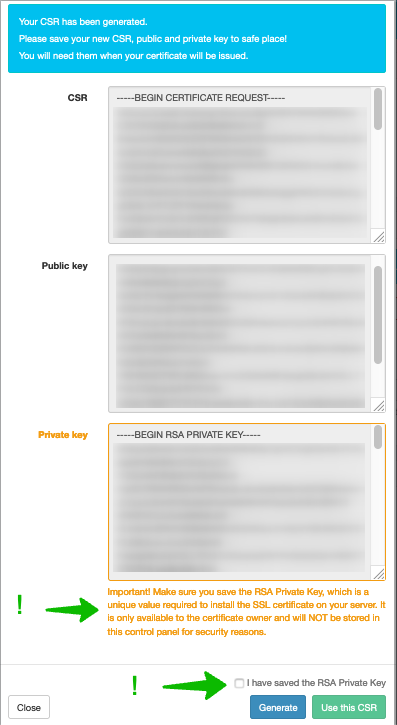
This private key will **not** be stored in Openprovider database, therefore, once lost or forgotten, it is not possible to retrieve this key again via Openprovider.
We advise you to store the private key in a location where you can easily locate it again, once you are ready to install your SSL certificate on your server.
In case you generate the CSR for the certificate in the Openprovider SSL Panel, you will be asked to confirm that you have stored the private key.
### What to do if one lost the private key
In some cases when the SSL certificate was already installed (in case of renewal) the private key will already be located on your server. If your SSL certificate was renewed for a new period and the CSR did not change, the private key is already stored in the server and installation of the new certificate would not give problems.
In case it is a new certificate or the private key is no longer in the server or lost / forgotten, the only option is to reissue (**not renew**) the SSL certificate.
During the reissue, you can connect a new CSR with a new private key to the SSL certificate. Once the reissue is issued, you can install this SSL certificate with the private key (which you stored on a safe place) on your server.
A reissue is free of charge.
# 🇪🇸 FAQ sobre Certificados SSL
A menudo vamos a solicitar un certificado y nos encontramos con un error que no entendemos, con que no sabemos cómo seguir o simplemente se nos vienen a la cabeza preguntas. En este artículo encontrarás respuesta a muchas preguntas:
**Solicitud**
**- Quiero cambiar el nombre de la empresa que aparece en la barra verde o quiero un nombre diferente al de mi empresa. ¿Cómo lo hago?**
El nombre de la barra verde debe ser idéntico al de la empresa.Si quieres cambiar el nombre debes pasar un proceso de validación. Puedes contactar con nosotros.
**He adquirido un certificado pro 2 años, sin embargo, aunque la fecha de la orden es de 2 años, el certificado caducará el tan solo 1 año. ¿qué ocurre?**
Exactamente, se renovará el certificado de manera automática por un año más. Esto significa que deberás realizar de nuevo la validación. Por norma general se utilizan los datos ya almacenados y trataremos de renovarlo directamente, si no es posible, deberás modificar los datos mediante "reexpedir" certificado.
**Renovación**
**- ¿Qué sucede si renuevo un certificado antes de la fecha de expiración? Esos días se añadirán al certificado nuevo?**
Puedes leer[este](https://openprovider.help/books/quick-start/page/renewal-policies-in-openprovider)artículo.
**- ¿Con cuánto tiempo de antelación puedo renovar un certificado?**
Puedes renovarlo hasta 30 dias antes de la expiración.
**- ¿Cómo puedo renovar un certificado caducado?**
No se puede. Debes solicitar uno nuevo.
#### **Expedición**
**- Ya tengo el certificado pero necesito generar el fichero .pem, ¿cómo lo obtengo?**
Solo proporcionamos la extensión P7B del certificado, pero puedes usar este conversor para obtener los archivos .pem
[https://sectigo.com/faqs/detail/SSL-Installation-Jetty-Java-HTTPS-Servlet-Web-Server/kA01N000000bsWi](https://sectigo.com/faqs/detail/SSL-Installation-Jetty-Java-HTTPS-Servlet-Web-Server/kA01N000000bsWi)
#### **Solicitud**
**- ¿He adquirido un certificado por dos años, ¿será válido para todo ese tiempo? ¿debo hacer algo?**
No, los certificados solo pueden ser válidos por un año, por lo tanto, tras el primer año, lo renovaremos automáticamente y deberá iniciar un nuevo proceso de validación si es aplicable (mediante reexpedir). Utilizaremos la información ya existente para su comodidad.
**Reexpedición**
**- He reexpedido el certificado pero no tengo la llave privada. ¿Qué hago?**
La llave privada solamente se muestra cuando se crea el CSR. Si no la tienes, debes crear de nuevo un CSR y volver a reexpedir el certificado con el nuevo CSR.
**Validación**
**- ¿Podemos acelerar el proceso de validación de un EV?**
No. Los certificados EV tienen su proceso, y no es corto. Para saber el estado puedes entrar en el panel SSL. Allí podrás comunicarte directamente con Comodo si el certificado es de Comodo y podrás leer los mensajes que Symantec deja. Si es de Symantec verás que incluso dejan un link para concertar la llamada. Puedes enviar ese link a tu cliente.
**- Qué puedo hacer si la validación tiene un aviso de "Security review failed"?**
Esto quiere decir que necesitan una revisión manual. Puedes enviarnos un email para que contactemos con el CA.
**- ¿Puedo usar diferentes empresas en un multidominio EV?**
No.
**- La validación telefónica ha fallado. ¿Qué debo hacer?**
Primero de todo es IMPORTANTE saber que solamente van a llamar a el número de teléfono que esté añadido en uno de estos directorios online:
Google Address
Paginas Amarillas
Guias 11811
D&B )
Guias11811
Paginas Blancas
Si no el número que quieres no aparece allí deberás crear un perfil o actualizar el actual y pasarnos (a nosotros o a Symantec) el link del perfil para que puedan llamar.
Además, si la validación ha fallado, podéis entrar en el certificado, en el SSL panel, y allí veréis que Symantec os ha dejado un mensaje con un link para concertar la llamada. Podéis pasar el link al cliente.
Si aún así tenéis problemas, podéis contactar con nosotros a soporte@openprovider.es.