# IDN domains
## Question
It is possible to register IDN domains?
## Answer
#### Via the control panel (RCP)
To register an IDN domain name, request the registration as a regular domain, from **Domains Overview > [Domain registration](https://cp.openprovider.eu/web/action/index#/domain/register)**.
Make sure the full name is written in the language that you select.
A mix of languages is not possible. So you can not create a domain that exists of multiple languages. All symbols of the domain need to be from the same language.
Otherwise, the error "*Domain creation failed: 2306, Parameter value policy error; IDN*
*mismatches with Language*" will be shown.
And then:
1\. Once the domain name is written, choose that domain's language.
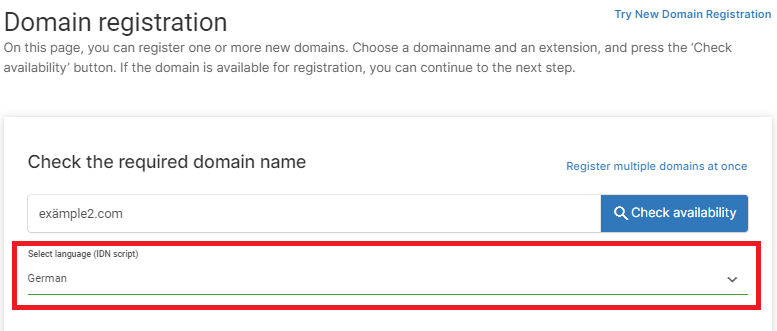
2\. Click on **Check availability** and our system will automatically transform that domain name into an IDN domain. You can select the domain and proceed as a usual domain name, adding the contacts and nameservers.
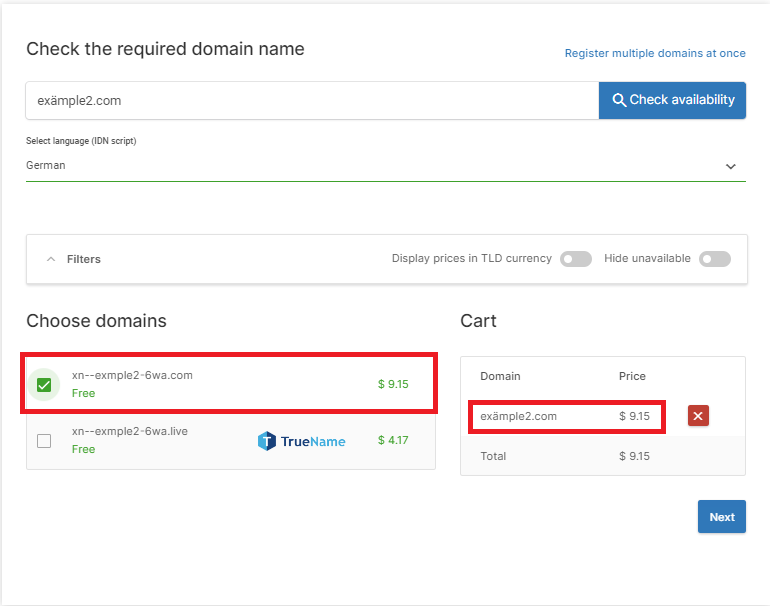
When configuring the DNS, just use the IDN variant and it will work without any issues.
#### Via API
For registering IDN domains via API, you need to specify the IDN script (what language or character set the domain name is applicable to) in the additional data section of the request.
**REST API**
```
"additional_data": {
"idn_script": "SPA",
},
```
Please refer to the REST API documentation for more details and to see an example registration request: [REST API - Create Domain](https://docs.openprovider.com/doc/domain.swagger#operation/CreateDomain)
To see a list of IDN scripts supported by specific domain extensions/TLDs, you may use the following REST API calls and look for "**supported\_idn\_scripts**" in the API response:
[REST API - ListTlds](https://docs.openprovider.com/doc/domain.swagger#operation/ListTlds)
[REST API - GetTld](https://docs.openprovider.com/doc/domain.swagger#operation/GetTld)
**XML API**
```
'additionalData' => array(
'idnScript' => 'ENG'
),
```
Please refer to the XML API documentation for more details and to see an example registration request:
[XML API - Create Domain](https://doc.openprovider.eu/API_Module_Domain_createDomainRequest)
[XML API - Format\_Additional\_Data](https://doc.openprovider.eu/API_Format_Additional_Data)
To see a list of IDN scripts supported by specific domain extensions/TLDs, you may use the following XML API calls and look for "**supportedIdnScripts**" in the API response:
[XML API - searchExtensionRequest](https://doc.openprovider.eu/API_Module_Extension_searchExtensionRequest)
[XML API - retrieveExtensionRequest](https://doc.openprovider.eu/API_Module_Extension_retrieveExtensionRequest)