# How to create a zone?

This articles contains the information about how you can create a zone in Openprovider.

## **Question :**

**How do I create a zone in Openprovider ?**

## **Answer :** 

You can create a zone in two ways :

1\. [Via Reseller Control Panel (RCP);](#bkmrk-creating-a-zone-via-)

2\. [Via API](#bkmrk-creating-a-zone-via--1)

### Creating a zone via Reseller Control Panel (RCP)

  
There are 2 options how to create a zone via the Reseller Control panel

1\. Via *DNS management*

2\. Via *Domain detail page*

  
1\. Via *DNS management*

- Go to ***DNS Management &gt; Zone Overview***
- Select the nameserver which you want to use.   
    This can be the Openprovider nameserver of the Premium Sectigo DNS nameserver. Want to know more about Premium Sectigo DNS, click **[here](https://openprovider.help/books/dns/page/premium-global-anycast-dns-service)**<span>!  
    </span>
- Fill in the domain and the extension.

***![image__42_.png](https://openprovider.help/uploads/images/gallery/2026-08/embedded-image-dllni8c3.png)***
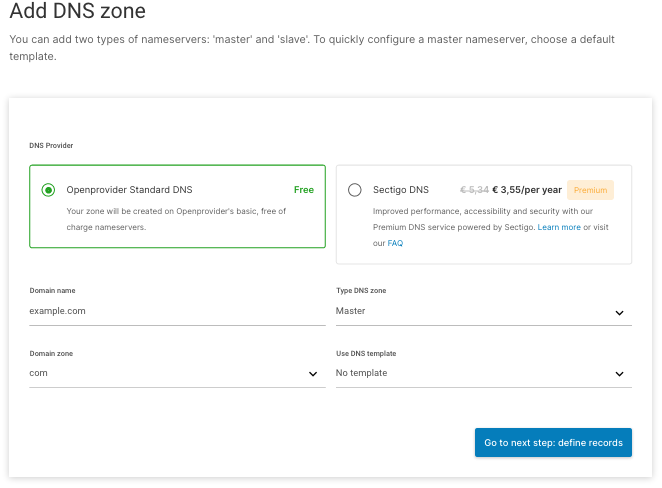
<div class="c-message_actions__container c-message__actions" id="bkmrk-choose-the-type-of-n"><div class="c-message_actions__group"><div class="c-virtual_list__item" id="bkmrk-choose-the-type-of-n-1"><div class="c-message_kit__background p-message_pane_message__message c-message_kit__message"><div class="c-message_kit__hover"><div class="c-message_kit__actions c-message_kit__actions--above"><div class="c-message_kit__gutter"><div class="c-message_kit__gutter__right"><div class="c-message_kit__blocks c-message_kit__blocks--rich_text"><div class="c-message__message_blocks c-message__message_blocks--rich_text"><div class="p-block_kit_renderer"><div class="p-block_kit_renderer__block_wrapper p-block_kit_renderer__block_wrapper--first"><div class="p-rich_text_block">- Choose the type of nameservers you want to use (Master or [Slave](https://openprovider.help/books/dns/page/how-to-use-openprovider-nameserver-as-slave)) , here you have the option to choose a [template](https://openprovider.help/books/dns/page/how-to-use-dns-templates), or make a completely new zone from scratch.
- In the next step, you can start to define the records you need
- Once finished, click ***A***<span>***dd DNS zone***.</span>

</div></div></div></div></div></div></div></div></div></div></div><div class="c-virtual_list__item" id="bkmrk-not-sure-what-type-o"><div class="c-message_kit__background c-message_kit__background--hovered p-message_pane_message__message c-message_kit__message"><div class="c-message_kit__hover c-message_kit__hover--hovered"><div class="c-message_kit__actions c-message_kit__actions--above"><div class="c-message_kit__gutter"><div class="c-message_kit__gutter__right"><div class="c-message_kit__blocks c-message_kit__blocks--rich_text"><div class="c-message__message_blocks c-message__message_blocks--rich_text"><div class="p-block_kit_renderer"><div class="p-block_kit_renderer__block_wrapper p-block_kit_renderer__block_wrapper--first"><div class="p-rich_text_block"><div class="p-rich_text_section"><div class="c-message_kit__gutter"><div class="c-message_kit__gutter__right"><div class="c-message_kit__blocks c-message_kit__blocks--rich_text"><div class="c-message__message_blocks c-message__message_blocks--rich_text"><div class="p-block_kit_renderer"><div class="p-block_kit_renderer__block_wrapper p-block_kit_renderer__block_wrapper--first"><div class="p-rich_text_block"><div class="p-rich_text_section">![image__43_.png](https://openprovider.help/uploads/images/gallery/2026-08/embedded-image-d0bv1ymx.png)</div>- Not sure what type of records to enter, have a look **[here](https://openprovider.help/books/dns/page/dns-records)** !

</div></div></div></div></div></div></div></div></div></div></div></div></div></div></div></div></div></div></div></div></div>  
2\. Via *Domain detail page*

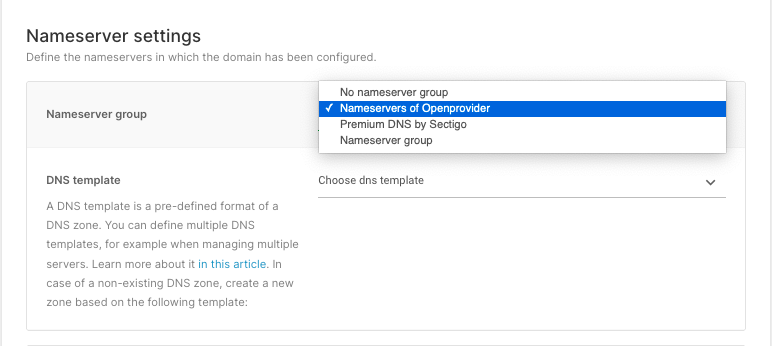
When you are registering or transferring a domain, you will be asked in the last step to define the nameserver you want to use. If you select the openprovider or Sectigo DNS nameservers, the system will automatically create a new zone, only containing the SOA and NS record.

You can also select a [template](https://openprovider.help/books/dns/page/how-to-use-dns-templates) here (optional), in order to create your zone in a <span class="ng-scope">pre-defined format. Be aware - this will not overwrite any zone and therefore will only work when there is no existing zone yet.  
</span>

  
![Screen_Shot_2021-10-14_at_15.02.50.png](https://openprovider.help/uploads/images/gallery/2026-08/embedded-image-ji3vufmx.png)

### Creating a zone via API

DNS Zone can also be created via Openprovider API.

Checkout [**this link**](https://docs.openprovider.com/doc/all#tag/descDNSQuickstart) to know more!

NOTE: Please review the Terms and Conditions of Openprovider DNS service [here](https://openprovider.help/books/dns/page/what-are-terms-conditions-of-openprovider-dns-service) before creating new zones for **external** domains.