# 7 Updating an approver email address
##### *This is a series of articles dedicated to demonstrating how to get acquainted with [Openprovider SSL API methods](https://openprovider.help/books/api-integrations/chapter/api-guides-ssl-module). If you want to go the beginning of this guide, please navigate to the article "[1 How to choose a product](https://openprovider.help/books/api-plugins/page/1-choosing-a-product)".*
*To get more information about our API in general, please [use our documentation portal](https://docs.openprovider.com/doc/all#operation/UpdateApproverEmailAddress) as your reference.*
Using the previous method "[6 Updating SSL Order](https://openprovider.help/books/api-plugins/page/6-updating-ssl-order)" we successfully changed a few details in our order and has requested it (sent to the CA). Now it is not However "[6 Updating SSL Order](https://openprovider.help/books/api-plugins/page/6-updating-ssl-order)" does not support approver email changeability.
Use current method to change approver email address for an SSL order in ["REQ" status](https://openprovider.help/books/api-plugins/page/api-guides-glossary#order_status_list).
It helps to change an email address of a person who will approve certificate issuance. Validation email will be resent automatically by the [CA](https://openprovider.help/books/api-plugins/page/api-guides-glossary#ca) to the new address.
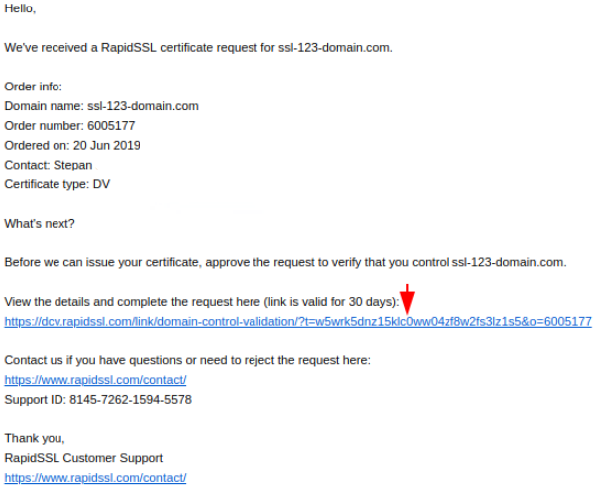
Validation email sent by the issuing CA will contain a URL needs to be followed.
Incoming email example below:
Use endpoint path below. Base URL is determined by both the target environment and API version.
REQUEST VALUES
| ### **Name**
| ### **Type**
| ### **Values**
| ### **Description**
|
|---|
| approver\_email | string | email address value | Valid email address from [pre-approved list](https://openprovider.help/books/api-plugins/page/3-retrieving-list-of-an-approver-emails).
(e.g. admin@example.com).
|
REQUEST EXAMPLE
```
curl -X PUT \
https://api.cte.openprovider.eu/v1beta/ssl/orders/31027 \
-H 'Authorization: Bearer deb4bf804928981b018caf45c3c4142b' \
-H 'Content-Type: application/json' \
-d '{
"approver_email": "webmaster@ssl-123-domain.com"
}'
```
RESPONSE EXAMPLE
```
{
"code": 0,
"data": {
"id": 1
},
"desc": ""
}
```
RESPONSE VALUES
| ### **Name**
| ### **Values**
| ### **Description**
|
|---|
| code
| API code returned.
| [API Result with code returned](https://openprovider.help/books/api-plugins/page/api-error-codes)**.**
**0 = Success with no errors.**
|
| **1. data**
| **Update Approver Email Address Response Data.** | **Response data returned while updating the approver email address.** |
| 1.1 id
| Digital value usually consists of 6 digits. | [Openprovider order ID](https://openprovider.help/books/api-plugins/page/api-guides-glossary#op_order_id). |
| desc
| Description text (if presented). | Description (if presented). |
| maintenance
| Boolean parameter: True or False. | Indicates if Openprovider is under maintenance mode. |
| **2. warnings**
| **An array of warning messages.** | **Warning data returned while updating the order.** |
| 2.1 code
| Numeric code if warning(s) detected. | Code value (digits). |
| 2.2 data
| Warning data values. | Data value returned. |
| 2.3 desc
| Description of warnings. | Description value returned. |