# 11 Open an access to an end user

<div id="bkmrk-this-is-a-series-of-"><div>*This is a series of articles dedicated to demonstrating how to get acquainted with[Openprovider SSL API methods](https://openprovider.help/books/api-integrations/chapter/api-guides-ssl-module). If you want to go the beginning of this guide, please navigate to the article "[1 How to choose a product](https://openprovider.help/books/api-plugins/page/1-choosing-a-product)".*

<div>*To get more information about our API in general, please[use our documentation portal](https://docs.openprovider.com/doc/all#operation/CreateOtpToken)as your reference.*

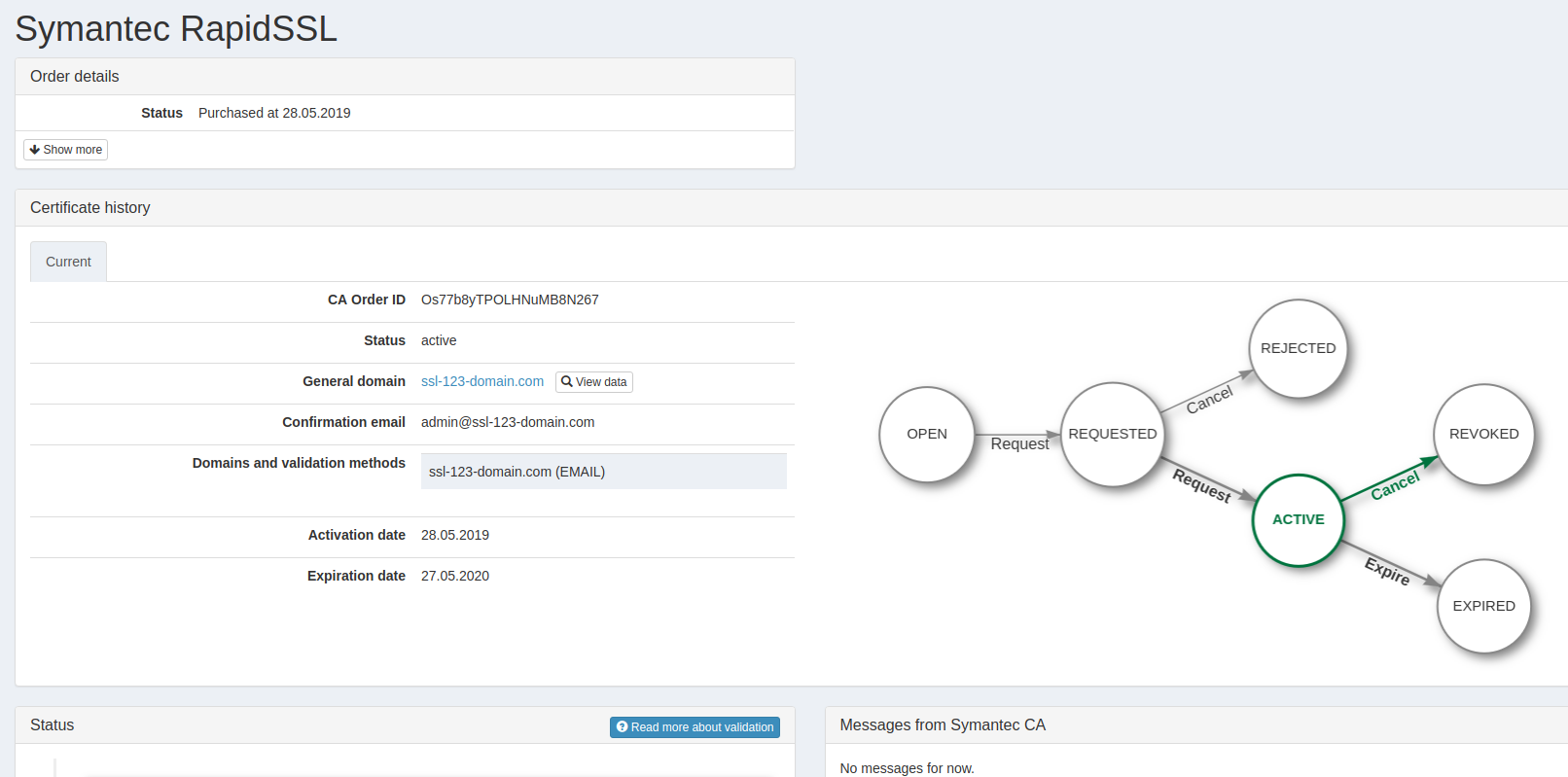
</div></div><div><span>You can provide an access for a particular order to your end user by generating a link that includes a token. The following link redirects user to SSL Panel. Please note the link has an expiration date.  
Customer will see SSL Panel with an order opened.</span></div><div><span>![mceclip0.png](https://openprovider.help/uploads/images/gallery/2026-08/embedded-image-ykqiczns.png)  
You can read more about this functionality [here.](https://openprovider.help/books/ssl-certificates/page/ssl-panel-end-users-access)</span></div><div><div>![Entering Geo Fence icon](https://openprovider.help/uploads/images/gallery/2026-08/embedded-image-yv4ddl8k.png)Use endpoint path below. Base URL is determined by both the target environment and API version.</div><div>```
<span><strong>POST <a href="https://docs.openprovider.com/doc/all#operation/CreateOtpToken">{base_url}</a></strong></span>/ssl/orders/<strong><a href="https://openprovider.help/books/api-plugins/page/api-guides-glossary#op_order_id">{id}</a></strong>/otp-tokens
```

</div></div></div><div id="bkmrk-request-values-name-"><span>  
</span><div><div id="bkmrk-request-values-name--1"><details><summary>REQUEST VALUES</summary>

<div><table><tbody><tr><th>### **Name**

</th><th>### **Type**

</th><th>### **Values**

</th><th>### **Description**

</th></tr><tr><td>id</td><td> string</td><td>numeric value</td><td>[Openprovider Order ID.](https://openprovider.help/books/api-plugins/page/api-guides-glossary#op_order_id)

</td></tr></tbody></table>

  
</div></details><details><summary>REQUEST EXAMPLE</summary>

<div>```
curl -X POST \<br></br> https://api.openprovider.eu/v1beta/ssl/orders/31234/otp-tokens \<br></br> -H 'Authorization: Bearer 2831a37fb8*******90b5aac822' \<br></br> -H 'Content-Type: application/json' \
```

</div></details><details><summary>RESPONSE EXAMPLE</summary>

<div>```
{<br></br>"code": 0,<br></br>"desc": "",<br></br>"data": {<br></br>"uri": "https://sslpanel.io/auth-order-otp-token",<br></br>"token": "RxFs3X_We6V12m0toZxmNuakfNm999BI",<br></br>"expire_at": "2023-11-27 09:01:05"<br></br>}<br></br>}
```

</div></details><details><summary>RESPONSE VALUES</summary>

<div><table><tbody><tr><th>### **Name**

</th><th>### **Values**

</th><th>### **Description**

</th></tr><tr><td>code

</td><td>numeric

</td><td>[API Result with code returned](https://openprovider.help/books/api-plugins/page/api-error-codes)<span>.</span>  
<span>0 = Success with no errors.</span>

</td></tr><tr><td>**1. data**</td><td>**set of values**</td><td>**Cancel Order Response Data.**</td></tr><tr><td>1.1 expire\_at</td><td><span>integer</span></td><td><span>Link expiration date.</span></td></tr><tr><td>1.2 token</td><td>string</td><td><span>Individual token.</span></td></tr><tr><td>1.3 uri</td><td>string</td><td>Individual link.</td></tr><tr><td>desc</td><td>string</td><td>Description.</td></tr><tr><td>maintenance</td><td>True or False.</td><td>The maintenance: True or False.</td></tr><tr><td>**2. warnings**</td><td>**Array of elements**</td><td>****An array of boolean and string data returned**<span> if Openprovider is under maintenance mode.</span>**</td></tr><tr><td>2.1 code</td><td><span>code digits</span></td><td><span>Warning code digits.</span></td></tr><tr><td>2.2 data</td><td>string</td><td><span>Data value returned.</span></td></tr><tr><td>2.3 desc</td><td>string</td><td><span>Description value returned.</span></td></tr></tbody></table>

</div></details></div></div>  
</div><div id="bkmrk-we-successfully%C2%A0gene">**We successfully generated a link for an order and can provide it to end-user where customer could track status of an order, change validation methods (if certificate yet not active), communicate with CA personnel etc.  
If you or your customer no longer need a certificate it could be cancelled:  
"[12 Cancelling SSL Order](https://openprovider.help/books/api-plugins/page/12-cancelling-ssl-order)".**</div>